Hi, Per,
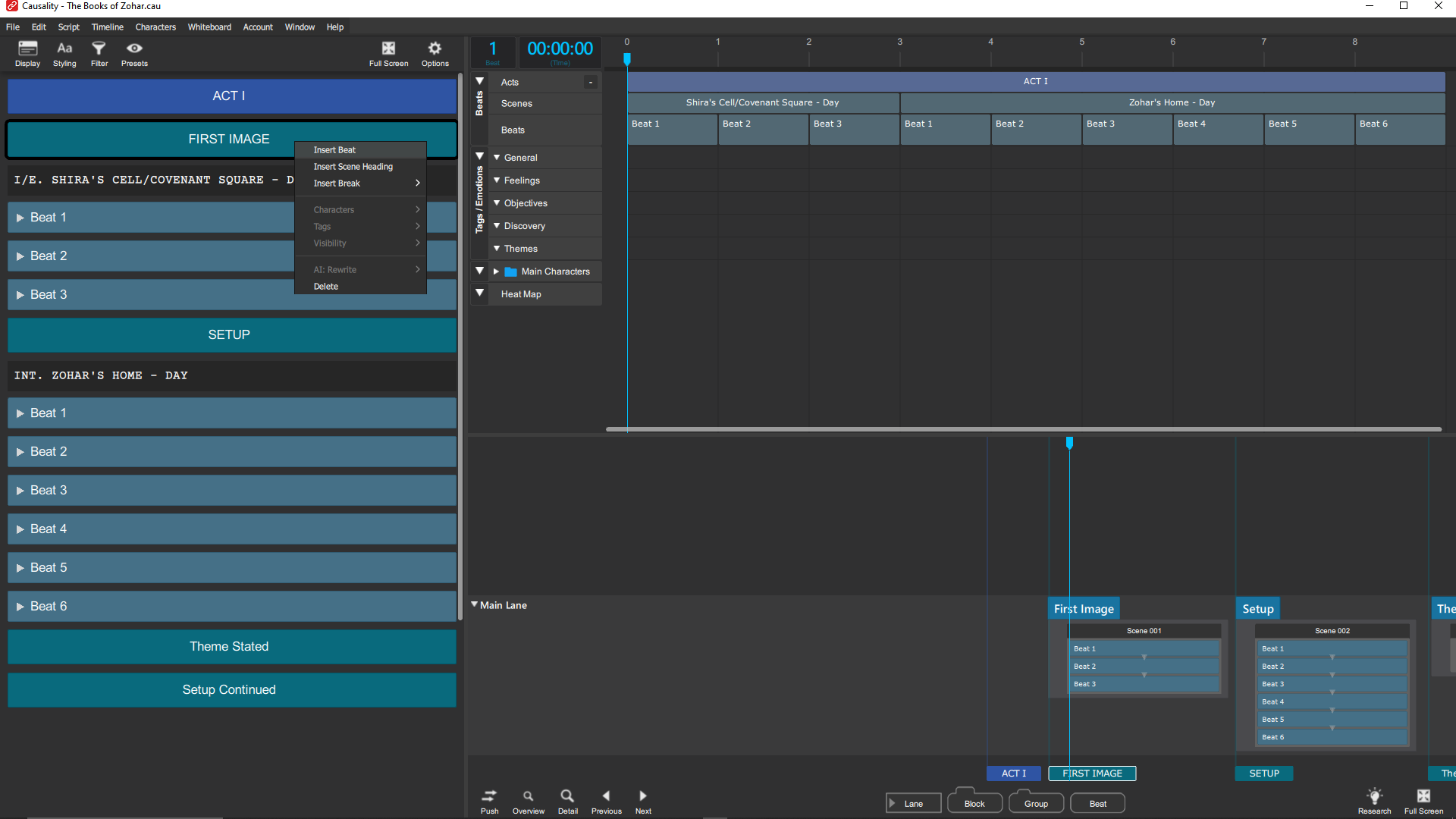
installed the4.0.11 and it became impossible to add a new scene- anywhere in the script view- without an immediate crash. I hope it’s not just me-
Jill.
Hi, Per,
installed the4.0.11 and it became impossible to add a new scene- anywhere in the script view- without an immediate crash. I hope it’s not just me-
Jill.
Hi Jill,
I can’t reproduce any issues regarding inserting scene headings. And this was also tested a lot in the last few days, because 4.0.11 fixes an issue with scene heading coloring.
Could you clarify the exact steps you take to create scene headings?
Thanks!
I sent you the “steps” + the crush logs and the actual script file a couple of days ago… hope to hear from u soon… Jill
Hi Jill,
The most important thing is still knowing exactly how you’re going about creating scene headings. I can’t reproduce anything, so I need to know exactly what you do, in the form of “I right click on the beat title and select Insert Scene Heading from the popup menu”.
Best,
Per
From email response: Wow- if I click on a beat it works fine- what i’ve been doing is click on the SECTION- like Theme Stated or Setup continued, so as to create a Scene heading under the right Sequence or section head (intending, then, to add beats to the new scene -does that help?
There’s still some detail missing, because there’s no option to create a scene heading when you right-click on a section. I’d love a screenshot of what you’re clicking.
Per
(From email:)
I got it now. I was on a novel document., which doesn’t have scene headings. Yes, that’s a bug. Insert Scene Heading is not supposed to be an option for any kind of break. It’s a beat feature. Good catch!
Via email:
Thanks! I’m glad i could help- but, isn’t that the “logical” order of things? Create an Act, create the first structural Point or Sequence, Create a scene, then create a beat? Like Russian Dolls?
In the way Causality understands scenes, they’re a property of beats. This is what allows the whiteboard to exist at all. Every beat is tagged with what location it wants to happen in. If you move a hospital beat somewhere else between two beats in an airport, a scene heading will be create to cut back to the hospital, and another one to cut back to the airport again.
The scene headings aren’t completely real or solid. They’re created and destroyed as needed in order to keep beat happening in the places that you wrote them for. And without this behavior, making any change in the whiteboard would instantly trash your script, as a hospital beat is moved to the airport, so in the middle of the airport scene, a doctor comes in and checks the character’s chart.
Beats are also not equal to scenes. Sometimes, a single scene has many beats. Think about any kitchen scene in Modern Family, or any Seinfeld scene early in an episode. It’s like a train station, where 5 or 10 storylines are intersecting in a single scene.
But either way, in order for Causality to magically handle scene headings, they belong to beats, and are shown and hidden as needed.
Bottom line is that you should just create a beat. The next level down from a section is a beat, not a scene. Considering that locations aren’t actually that important. If you’re lucky enough to get a script into production, a script scheduler will take a sledgehammer to your scenes in order to remove as many non-essential locations as possible. A scene that happened on a bus will happen at the bus station instead because you have other scenes there. A penthouse apartment will be moved to a back alley because it’s cheaper. Locations get almost no respect if this thing ever gets shot, and you should expect very few locations to survive as you imagined them.
And that’s fine, it just goes to show that all that really matters is what happens in the beats. They’re the story, and it doesn’t truly matter where they happen.
Undrstood! Thanks for taking the time to open my eyes- I’m so used to thinking of Beats as mini sections of Scenes- and the smallest units of a script- always analyzing a Scene into its Beats… Jill.