Version 4.0.27.
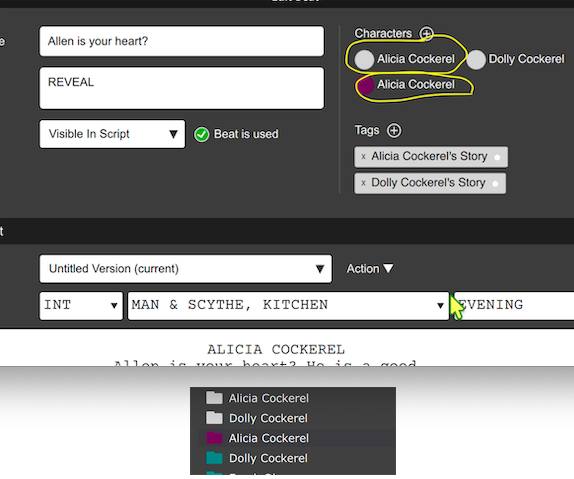
When typing in a scene, when mentioning a character or selecting an existing character from the provided drop-down of characters for character dialogue, it auto-creates a duplicate character with a different colour. (in the attached images, the characters with light colour are the originals, the purple and green auto-added).
After every writing session, have to go through removing and fixing the characters.
Hi,
That’s unusual indeed. For helping with debugging, I’d love if you could go into the detection words for each character and see if there’s any difference between them, e.g. spaces before/after, punctuation, anything that makes these not exactly the same.
Hi Per, thanks for the rapid response, as always. I checked all characters and all had empty detection words box, not sure how that happened. So I entered each characters’ detection words box, it auto-completed with their name. Now it is all working as expected. Thanks.
Hi,
We had a bug for a couple of releases where we forgot to auto-populate the detection words, so it’s possible it was caused then.
What version are you on now? And quick test, type character name in a beat that you’ve never typed before, click elsewhere, and go inspect the created character. Does it have detection words? Also, are the detection words automatically populated when the type the character’s name in the dialog?
Per
Hi Per,
On v4.0.28.
”type character name in a beat that you’ve never typed before, click elsewhere, and go inspect the created character. Does it have detection words?” - yes, character created, and created with correct detection words.
“are the detection words automatically populated when the type the character’s name in the dialog?” - yes.
Adrian
Hi,
Then your situation must have been a left-over from the brief time where we had this bug. I’m sorry about that. Please stay alert to whether anything is wonky in this area now.