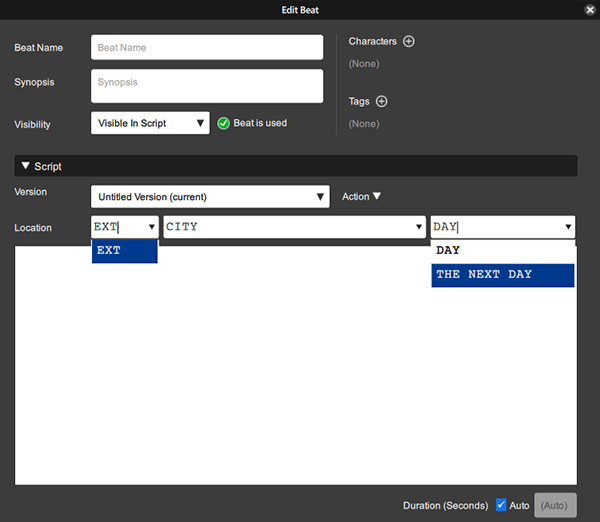
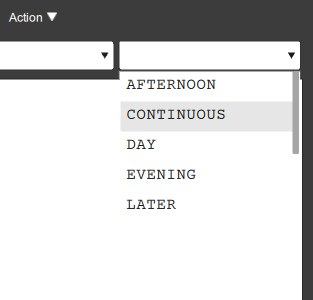
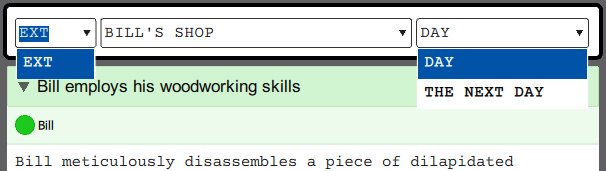
Both dropdowns should display all available options:
INT
EXT
I/E
And:
AFTERNOON
CONTINUOUS
DAY
EVENING
LATER
MOMENTS LATER
MORNING
NIGHT
THE NEXT DAY
Respectively
NOTES
The behavior is not always consistent. Occasionally the int/ext field will populate with all three options. However the time of day field does not.
Unable to determine why int/ext sometimes shows all options, sometimes doesn’t.
If you clear the default value for the time of day field, then the dropdown populates with all options.
While it’s a small amount of time to click on the fields and manually enter values, cumulatively this time adds up.
When the time of day field is fully populated, it produces a scroll bar. Since there are only 9 options, I recommend the entire list of times be displayed so the User does have to scroll to find their desired option.
For Location, select the left dropdown (int/ext), take note of options
For Location, select the right dropdown (time of day), take note of options
RESULT
Neither field displays a list of all options
EXPECTED
Both fields should display a dropdown that lists all options
NOTES
As with Beats in the Whiteboard view, Users must click in the fields and clear the existing value, before Causality displays the full list of all options.
If a User has many scenes where they want to change the time or interior/exterior, it can become a chore.
Yes… I’ve noticed the same. It happen because the list is being searched (matched) by what’s in the text field. This works well when you reuse the same location or time of day, but if you want to view all choices, you must clear the field, as you’ve noted.
I believe the dropdown is really an auto-complete, and once a few things have been typed, fewer and fewer options remain.
Since it sounds like this stayed counter-intuitive for you even with extended use, let’s pin down what your intuition is.
I agree that when there are a few items on the list (int/ext), then I would personally rather see the entire list and my place on it.
But it doesn’t seem as cut and dried for the location list, because that can have hundreds of things on it. Do we still want to see all 100 items, and a blue background on item number 80? No typical auto complete works like that.
I’m having a bit of a hard time see which pattern is right.
For me personally I’d like to see the int/ext dropdown automatically populated with INT, EXT, and INT/EXT
For time of day, I’d like to see the dropdown populated with MORNING, DAY, AFTERNOON, EVENING, and NIGHT. Corner cases like DAWN, SUNSET, THE DAY AFTER etc. could be entered manually.
These are the elements of the scene heading I change most often, and autofill slows me down.
I’m not concerned with the specific location list (Joe’s Apartment, Warehouse, City Street, etc). I feel when an author needs to change those across a screenplay or sceries of scenes, they could be addressed with find & replace.
Does seem logical? Or am I the corner case here? I honestly don’t know.
I do think it’s an extreme corner case. The location is what needs the most auto-complete. The only truly fixed field is the Int/Ext, it only ever has three values, so you could skip the filtering there. But the location will have hundreds of entries, and I doubt that many people are in the mood for an extra step of first putting something temporary in there, and then coming back to change it.
As for the time of day field, on a typical screenplay, it ends up holding about 30 values, once you’re done with all the “later” and “5 mins later” and “later that night” and whatever.
So the only rule that could really be made is that filtering doesn’t kick in until there are X number of items in the auto-complete menu. But then we back into a bigger problem, is that these subtle kinds of changes in behavior can be terribly counter-intuitive, because as soon as you think you’ve learned it, it changes, because now that are 6 items in the menu.
So I feel that whatever design the auto-complete dropdowns lands on, it has to be the same behavior for all cases. I think that for locations, if we don’t filter, then all we can really do is drop you off in the neighborhood of the right string, and then you have to find the rest, with little reduction in the number of menu items you have to scroll through.
So my vote is still on the auto-complete. And the real question is if it’s actually behaving properly as an auto-complete, and finding out what’s standard.
Certainly. So the option that would be on the table is to not reduce the contents of the menu if there’s less than X items in it.
I think I stand by the worries posted previously, that having two patterns is worse than one, because you lose the ability to intuit which mode you’re in, and suddenly using drop down menus because a source of surprise.
I agree that I have felt from time to time that there was something weird about the auto-complete dropdowns, but I’m not sure list length is the problem. I’ll have to look at more auto-completes to see what people generally do.