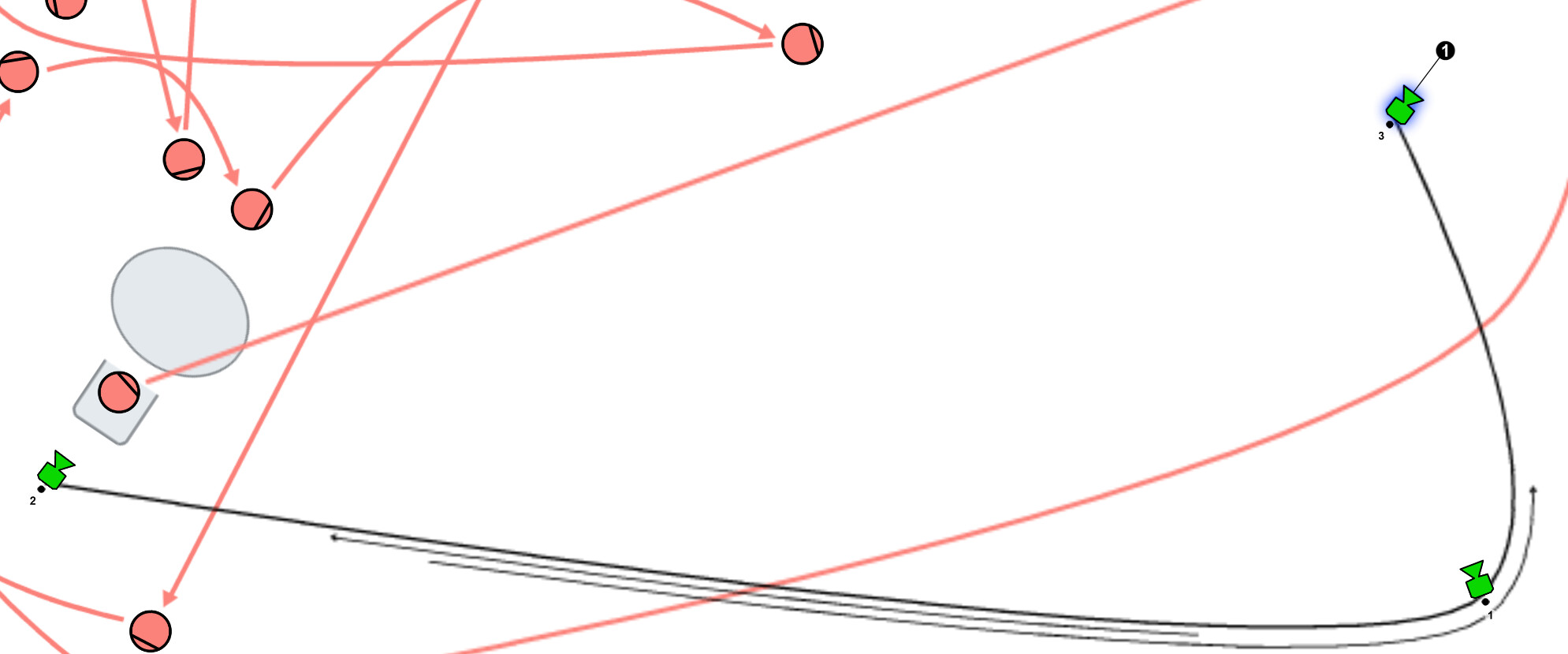
I have a scene that will be shot 100% steadicam.
I am trying to move camera from 2 to 3, but Shot Designer forces movement through 1 as if it were on a track. How can I get it to move straight to 3?
I have a scene that will be shot 100% steadicam.
I am trying to move camera from 2 to 3, but Shot Designer forces movement through 1 as if it were on a track. How can I get it to move straight to 3?
Hi,
We talked about this via email, and let me just summarize.
The app works simply with cameras moving between marks on the provided paths. That means that if you go from mark 1 to mark 3, you necessarily go through mark 2.
In this way, the app is designed to be agnostic about what kind of support is under the camera, and in truth, this changes a lot, even during shooting.
Now, it is interesting to be able to go directly between the marks, but it’s technically prohibitive in the current version.
But the upcoming 3D version calculates motion differently. Instead of being required to move through marks, you simply make connections between all the marks that you want to move between, and it doesn’t have to be linear. You can go from mark 1, 2, 3, 4, and then back to 2, as long as you make a path directly between 4 and 2 (which you might need to bend etc, so it does need to be a path). Then the software uses Dijktra’s Algorithm to find the shortest path to go between the marks, like trains finding their way between cities. This will allow what you’re trying to do, along with crab-dolly work that also goes between arbitrary marks.