Causality Tutorials

Hi everyone,

I’ve been using Causality for a couple of days now and I’m really impressed by how powerful and unique it is. However, I don’t find any complete tutorials or full example projects that explain how to use it from start to finish — especially compared to other screenwriting tools on the market that have a lot more learning content.

If anyone knows of any great learning resources — video tutorials, project breakdowns, or even sample files that show a full workflow — I’d really appreciate your suggestions.

1 Like

Hi,

There’s a whole new batch of tutorials coming, and the old tutorials will be delisted. Many of the old tutorials are actually half-decent, except that many things are called something else now, and that’s infinitely confusing.

But we totally hear you, and all the tutorials are in the process of being replaced. We’ve just focused on getting version 4.0 to be as stable as possible. It’s a big release, and a stable app is even more important than tutorials.

Have you downloaded the Terminator 2 sample script? This also functions as a feature walk-through, and a recommendation for how to structure a story.

Per

Hi Perhomles and thenaks for replay
I’ve recently been studying the Terminator sample project and found it very insightful — it really helped me understand several of your structural techniques. That said, I think a clear tutorial path or guided learning series would make it much easier for new users and professionals alike to explore the software’s full potential.
As a director, I’m especially excited about the upcoming Shot List feature Also, do you plan to release in next road map?

Thank you for your time and for continuing to develop such a powerful storytelling tool.

1 Like

Thanks!

Indeed, that’s all coming soon!

Per

1 Like

can we know when it will be posted? am really interested in this software !

Hi,

Indeed, where are they? We’re such a small crew, it’s a choice between spending a month making tutorials or spending a month getting us to the features people are demanding the most.

I guess we also have a bit of masochism mixed in, that the software ought to work without instructions, and if it doesn’t, it’s a software problem and not a tutorial problem.

So on that note, would you be able to articulate what stumbling blocks you’re facing, what you don’t understand, what’s stopping you from being able to work in the app? Stuff like that is gold for us.

am loving the interface … more like Avid for Screenwriting … but am still not able to blend character and plot beats together.. am finding difficulty while developing the Plot… am not a plotter, more of panster … so i would like to develop as i go …am still not understanding “Tags
” …. cant precisely articulate .. but am finding problems in the development stage … rewrites are really good with this software .. after seeing the big picture … i was thinking the tutorials will get me closer

1 Like

This is one of my biggest issues. Of course, I’m not aware of any other scriptwriting software that handles it either.

I’ve now written more than 6 episodes (300+ pages) in Causality and have developed some habits. Not necessarily good habits.

I track storylines (aka plots) with vertical separation.

Initially I used lanes for that, but Per convinced me to use blocks. So, if there are three storylines, there are three “rows” (horizontal blocks across) the whiteboard.

I track characters by color.

Here I mean primary characters. For example, protagonist is blue, antagonist is red, mentor is yellow, love interest is pink, henchman is green, etc. When a beat includes multiple characters, I select a primary and use that color. Not perfect, but works okay.

Typically, the storylines follow a specific character. So, most of that storyline will tend to be the same color, but there are exceptions when other characters get pulled into that storyline.

With this arrangement, I can view the general structure of an episode fairly well, and I can distribute action (plot) in “causal order” fairly well.

And, the most excellent feature of Causality is that I can slide beats between episodes. This happens frequently when writing TV series.

I stopped using tags because I found they either duplicated plot or duplicated character. So, there was no point in my case. I’m probably using them wrong.

Something else I’ve noticed over time: in my world, scenes = beats.

Meaning… out of 300 pages of script, very few scenes are composed of multiple “causality beats.” Maybe this is due to these being TV centric. Although, last month I wrote a movie (now in preproduction, yeah!) and it followed the same pattern.

I guess I’m just a simple writer! I keep a huge file of “potential beats” in Google Docs. But, as they get pulled into scenes, they don’t remain as separate beats.

Thank you … Looks like you are sorted :slight_smile:

Hi,

This is a very interesting discussion, though, and ought to be continued. We’re not 100% sure that we’re hitting the butter zone either, but since nobody else has built this app before, there are some unsolved questions.

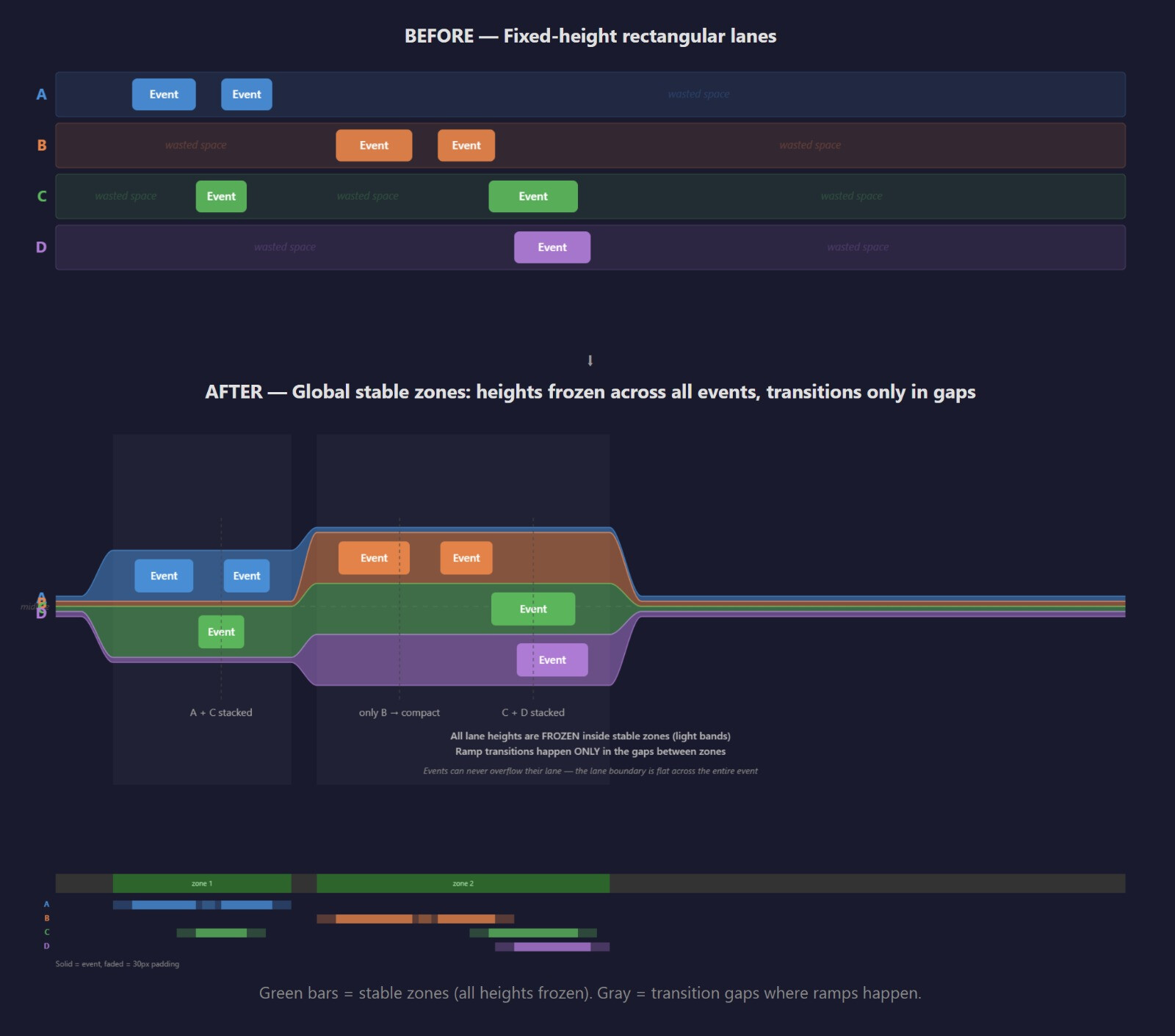
One thing that bothers me to no end is that lanes don’t seem to do their job. Sure, they’re OK when there are just a few. But they’re mostly empty space. And if you start to use lanes like storylines, everything breaks down, because you’d need 20-30 lanes to articulate the story in a satisfying way. And because of that, we basically have to recommend that people only use lanes sparingly, which is a massive failure.

We’re strongly considering lanes that are auto-collapsed, in what is called a “stacked graph”. Here is a drawing from my prototyping. Explanation below.

Here, lanes only take up vertical space when they’re active, and otherwise collapse to being very small. Now suddenly:

  • You can use lanes for storylines again. Even if a storyline is wasteful (some small running gag or whatever), it’s not sacrilege to put it into its own storylines.
  • We don’t have to recommend that people won’t use them.
  • We’d get rid of blocks in the same breath, and instead have blocks be a kind of marker or section inside a lane.

Not all problems with this approach are solved. For example, if you have 40 lanes and only 2 of them are active, what do the remaining 38 look like? Just a party-band of colored stripes? How can you reason about that?

And how do you open lanes up for editing? Just by dropping something in them?

And final question, is it nice? Does this bring something you don’t otherwise have.

But to your original question, how do you mix plot and character? Most writing teachers would say don’t.

My personal opinion is to develop them separately. Develop the bank robbery knowing in the back of your mind what the character development levels are doing. And develop the character levels with the bank robbery tracks somewhere in the back of your mind.

And then look for ways to get them to cause each other. If you’re standing in the bank robbery track, and you need a reason for a character to do something, and it’s because he’s angry and bitchy, now work backwards on the character development tracks to reveal his personality, that he flies off the handle at small things. They didn’t have a 2L cola at the supermarket, only 12oz cans, and he goes wild on the cashier. Then you build backwards, and at the point where the bank robbery needs him to fly off the handle, it’s already set up.

And if a character handles poorly under pressure, and their ultimate arc is to handle better under pressure, then the bank robbery can help you with both. Early on, a botched robbery can make your character panic and lose all self-confidence. Then the character track builds up self-confidence, which again becomes useful at the end, that their newfound self-confidence is what makes the robbery a success.

The point is that the storylines need each other. You can’t just make the bank robbery track work on its own, because it has no fuel. The character track provides reasons for things to happen. And the bank robbery provides reasons for things to change on the character track.

The two aspects don’t have to be constantly enmeshed. It’s actually a more satisfying story if they’re not. They just need to have points of contact, and between them, it’s actually better if each storyline goes off on its own to grow and change, because then it feels real and necessary where one storyline provides the necessary impact to another storyline.

I hope this helps!